AEN banner

Main

Future World Archives

June 21, 2008

Test Track High Banks

Photographic Innoventions by Scott Thomas

At speed on Test Track's high banked turns in Epcot, Walt Disney World, Orlando, Florida
At speed on Test Track's high banked turns in Epcot.
Nikon D70/18-200VR, 1/40s, f/8, 200 ISO, -0.3 EV, 18mm Focal Length

I'm a big NASCAR fan. I even did Richard Petty's Driving Experience once at Walt Disney World. For my Disney Pic of the Week featuring a Ride, I picked the next best thing to feeling like you are on a big track which is riding the high banks on Test Track in Epcot's Future World. In this picture I sat in the back seat to get more of the car, slowed the camera's shutter speed down to capture the motion of the car on the track and rode it late in the day for better lighting. I secured the camera with the strap around my neck and looped around my wrists.

September 26, 2008

The Digital Darkroom

Photographic Innoventions by Scott Thomas

Before I go on talking about organizing our digital library of photographs, I want to introduce you to the new breed of software that were released a couple of years ago I refer to as digital darkroom programs. These programs assist you in organizing, editing and outputting (either files or prints) your digital photos in one place. You no longer need more than one program to do each of these tasks.

The two programs I want to talk about are Adobe Lightroom 2 (PC and Mac) and Apple Aperture 2 (Mac only). Now, I know there's a lot of discussion on which one to use in photography forums. I think both do a great job. If you have not looked at either of these programs, you can download free trials from Adobe and Apple.

Photo management software from Adobe and Apple.

What these programs do is import your photos from your camera or memory cards and place them into one image database. If you've been following this series, you know I put my photos into specific folders on my computer system depending on the year and month they were taken. Both of these programs will allow you to keep such a system and give you the freedom to create projects or collections within their image database or library as I like to call it. I use Aperture 2 and as an example I want to show you how I use Aperture's organizational power.

I set up a Project called Walt Disney World. Inside this project I have each of my trips in a folder labeled WDW_YYYYMM (so far I haven't stayed over a two month span yet but I would still separate the photos on my hard drive into separate folders). My last trip from May, 2008 is in folder WDW_200805 and has a few thousand photos. I have some albums in the WDW project I have set up for various reasons. One is called POTW (for the Picture This! Picture of the Week theme) where I have past and upcoming photos for the themes Lisa, Barrie and I have come up with. An album consists of photos I have moved into it. The photos are not actually in the album or folders but point back to the photo's location in the library. ONe photo can be in multiple projects, folders or albums. Luckily, I don't have to worry about where the photos files are as Aperture takes care of all that for me. I just drag and drop.

I can also search for a group of photos and this is where metadata comes in very handy. Let's say I want to create an album with just my photos of Epcot's Spaceship Earth. Since I have added the keywords, spacehip earth, to all my photos I have taken of this attraction, I can pull up a view of all of those photos easily by typing it into the search box. Once I have that view, I can create an album with a simple click of my mouse. If I had not added keywords, it would have taken me a long time to look through each of my WDW folders and pick out all the Spaceship Earth ones.

If you are looking to easily organize, process and print your digital photographs and have not looked at either Aperture or Lightroom, I think you will be very surprised at how versatile these programs are. Both have come out with second versions in the last few months with vast improvements over their first editions.

November 7, 2008

An Odd Rule

Photographic Innoventions by Scott Thomas

Here is a photography rule which I read about when researching the previous blog on the Sunny 16 Rule I wrote about last time. This one is called the Rule of Odds. The rule states an odd number of objects should be sought out for a shot. This results in a natural framing of the objects, adding comfort and depth to the artwork.

Okay, though I tend to put 1, 3 or more odd numbered subjects in my photos than even numbers, I pay more attention to the Rule of Thirds when I am composing in the viewfinder. However, it looks like Disney Imagineers use this rule. Below is a photo of the five balloons which hang from the ceiling in Epcot's Land Pavilion. The middle one represents Earth while the four surrounding balloons represent the seasons: Yellow for Summer, Orange for Fall, Blue for Winter and Green for Spring.

The five balloons hanging from The Land pavilion's ceiling in Epcot, Walt Disney World, Orlando, Florida.
The odd numbered balloons hanging from the ceiling of The Land pavilion in Epcot.
Nikon D70/18-200VR, 1/60s, f/4.5, 200 ISO, 36mm Focal length

Again, I don't purposely go out and look for an odd number when I am composing my photographs. Since this is a compositional rule and, like all rules in photography, they are more like guidelines anyway (now, where have we heard that before?), I wouldn't go out of my way to do this. It's something to keep in mind when you have time to do so.

November 14, 2008

Photographing Christmas Lights at Disney

Photographic Innoventions by Scott Thomas

Ready for Christmas yet? Shopping all done? Gifts wrapped? Yeah, me neither. Here is something you can start doing at Walt Disney World today. Taking pictures of the fabulous Christmas decorations in the themeparks and resorts. With more coming by the end of November with the Osborne Family Spectacle of Dancing Lights at Disney's Hollywood Studios, Christmas parades and special events held all through the holiday season.

Planet Hollywood restaurant sign in Downtown Disney, Walt Disney World, Orlando, Florida
How best to capture the millions of lights Disney Imagineers use is our topic for today and I have a some tips for you. Let's start with something people often overlook as it gets dark so early in November and December. Take photos of lighting displays during the magic hour after sunset when the sky and lights become balanced. Though it's not a Christmas display, the photo of the Planet Hollywood sign demonstrates what I am talking about here. I used AWB (Automatic White Balance) here while others will say to switch to a Tungsten or Incandescent white balance for best results. A tripod would be useful but I get good results shooting down to a quarter second (1/4s) with image stabilized lenses. The key is to wait for the sky and lights to come together. Keep taking shots until you start to see the results you are looking for. The provided link will go into more detail.

Now you are saying to yourself, who has time to wait for the light at Disney besides it's mostly full night when you are there. The lights are so pretty, there's got to be a way to photograph them. Well, you are right. Below is a technique you can use called "Dragging the Shutter". This technique is used a lot in wedding photography to allow for room lighting to be seen instead of stark dark backgrounds in large banquet halls.

Christmas Donald Duck Topiary in Epcot, Walt Disney World, Orlando, Florida.
Nikon D70/18-70D, 1/30s, f/4.5, ISO 400, +0.6 EV, 46mm Focal length

On camera and external flash are normally synced at shutter speeds between 1/60 and 1/250 of a second. When you use a flash and purposely use shutter speeds below the normal flash sync speed, it allows more time for ambient light to be captured by the camera's sensor. This gives a more pleasing and natural look to the photograph as you see on the right hand photo of the Donald Duck topiary I took at Epcot during Mousefest 2006. Both photos were taken the same way except for the use of flash. This can also be called Slow Sync in your camera manuals.

Using flash for photos of large areas is not practical. For best results, we have to use long shutter speeds (of less than 1/60th of a second), high ISO speeds of 800 or greater and find a way to stabilize our cameras. In the photo of Main Street USA, I was able to do all three.

Magic Kingdom's Main Street USA all decked out for Christmas, Walt Disney World, Orlando, Florida.
Magic Kingdom's Main Street USA all decked out for Christmas.
Nikon D70/18-70D, 1/20s, f/4.2, ISO 1600, +0.3 EV, 35mm Focal length

As you can see, I am using a very high ISO of 1600 (my camera's highest available), a shutter speed of 1/20 of a second and I stabilized the camera by leaning against a garbage can and using my elbows to form a human tripod. I took several images to make sure I had a few which would come out sharp. If I had a real tripod, I could have used even slower shutter speeds and smaller apertures but I'll leave that discussion for another time.

By using these tips both at Disney or at home, your Christmas light photography will make your friends and family envious of your talents. Click this link for more tips on capturing the spirit of Christmas photographically. That's my gift to all of you!

January 23, 2009

Case for Using a Polarizer Filter

Photographic Innoventions by Scott Thomas

In this age when photo software can duplicate almost any effect film photographers used filters for, I still find one filter very useful. The Polarizing filter does just what polarizer sunglasses do, they cut down on the glare from the sun. Most people use a circular polarizing filter which means the filter moves once it is mounted on your lens in a circular motion. This gives you various amounts of polarization which you can see in your viewfinder.

In the photos below of the Dolphin resort in Disney's Boardwalk area, I used a Nikon 50mm f/1.8 lens with a 52mm circular polarizing filter by Hoya. The top image is with the polarizer in it's weakest position with no affect on the light. The bottom image is after I rotated the filter to it's strongest position giving the very deep blue sky color. Notice the loss of light hitting the camera's sensor. In this case, the shutter speed and aperture both decreased for a combined loss of 1 stop (see Exif data in the caption).

Dolphin Resort, Walt Disney World, Orlando, Florida.
Polarizing Filter Effect.
Top Image: Nikon D70/50mm, 1/80s, f/11, ISO 200, EV +0.3
Bottom Image: Nikon D70/50mm, 1/60s, f/10, ISO 200, EV +0.3

I know what you are thinking. Even the most rudimentary photo program can deepen a blue sky. True, but I didn't have to take the time. It takes a second or two to move the filter into the position I wanted. Besides, that's not the only thing a polarizer filter can do.

Reflections can be greatly cut down and even eliminated using a polarizing filter. Check out the photos below where Spaceship Earth is reflected in one of the water pools near The Land pavilion in Epcot. The one on the left is with the polarizer filter at it's weakest position. The one on the right is at it's strongest position. In this case, only a half stop of light was lost thanks to a very bright Florida sun. You will notice how the reflection is diminished so you can see the rocks on the pool's bottom. This works on reflections through glass, too.

Spaceship Earth reflection in Epcot, Walt Disney World, Orlando, Florida.
Water reflection Polarizing Filter Effect.
Left Image: Nikon D70/50mm, 1/60s, f/13, ISO 200, EV +0.3
Right Image: Nikon D70/50mm, 1/60s, f/11, ISO 200, EV +0.3

Reflections are a bit harder to get rid of in software. At least in the time it took me to rotate the polarizing filter.

Like any filter, circular polarizing filters come in various sizes to fit over many different lenses. Some are cheap, while others are more expensive. Other alternatives is to check a local photography shop to see if they have any used ones or on eBay. Make sure you know the size, in millimeters, of the lens you are buying for.

February 13, 2009

Rule Breaking with Symmetry

Photographic Innoventions by Scott Thomas

Symmetry in it's purest sense is an object which, if cut directly down the middle, would be mirror images of each other. It's one of the ways to break the Rule of Thirds correctly. Hope that doesn't confuse you. It's easy to find a symmetrical object but the images I've chosen to show you here are symmetrical but not mirror images. They are close enough to show you how to use symmetry in your photography.

The first is of the Swan Resort taken from a room in the Dolphin Resort. Like a lot of buildings, the Swan, itself, is symmetrical as is the landscaping and walkways leading up to and away from it. I think the surrounding foreground and background of the buildings and the Friendship boat dock add to the photo.

Swan Resort in the Boardwalk Resort area, Walt Disney World, Orlando, Florida.
Nikon D70/18-200VR, 1/250s, f/8, ISO 200, EV 0, 20mm Focal length

The next one is from the Pop Century resort. The large Mickey Mouse phone is symmetrically placed between the resort buildings and the Fooseball men. This is not close to being perfectly symmetrical, yet a pleasing composition with the main subject in the center of the photo.

Mickey Mouse Phone icon at the Pop Century Resort, Walt Disney World, Orlando, Florida.
Nikon D70/18-70D, 1/320s, f/9, ISO 200, EV +0.3, 18mm Focal length

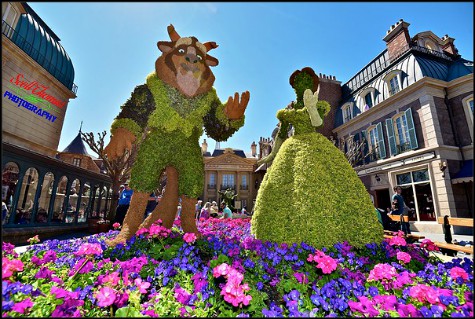
The last example was taken during the 2007 Epcot International Flower & Garden Festival. The Prince and Cinderella topiary was placed in the center of a sea of flowers flanked by trimmed flowering and green bushes and trees.

Prince and Cinderella topiary in Epcot during the 2007 International Flower & Garden Festival, Walt Disney World, Orlando, Florida.
Nikon D70/18-2000VR, 1/160s, f/11, ISO 200, EV -0.3, 18mm Focal length

When taking these photographs, I kept telling myself I was breaking a photography "rule". That is the something I want you to take away from this article. It's okay to break rules in photography when it works (as in the above photos) and you know you are doing it. Just putting something in the middle of your viewfinder does not make it symmetrical.

February 17, 2009

Disney Pic of the Week: MouseGear

Photographic Innoventions by Scott Thomas

Let's see, I introduced Restaurants, Merchandise and now Shops for the Disney Pic of the Week. I'm sensing another kind of theme myself here. Barrie? Lisa? Care to comment? Well, since I used the Epcot Pin Station for Merchandise, I'll stay in Epcot with a photo of the neon lighted MouseGear store which is the second largest shop on Walt Disney World property.

MouseGear is located in Epcot's Innoventions East, Walt Disney World, Orlando, Florida
MouseGear is located in Epcot's Innoventions East.
Nikon D70/18-200VR, 1/15s, f/4.2, 900 ISO, +0.3 EV, 29mm Focal Length

Barrie and Lisa will be showing you their favorite Shops at Disney this Thursday and Saturday.

March 5, 2009

Golden Earth

Photographic Innoventions by Scott Thomas

A lighted close up of the panels on Spaceship Earth in Epcot's Future World, Walt Disney World, Orlando, Florida
A lighted close up of the panels on Spaceship Earth.
Nikon D70/18-200VR, 1/8s, f/3.5, 1100 ISO, +0.3 EV, 18mm Focal Length

Abstracts are not my strong point when it comes to photography. I am more along the lines of a photojournalist so this week's Disney Pic of the Week theme on Abstracts was a tough one. I wanted to make sure if you were a fan of the parks you would recognize it being from Walt Disney World. As I was walking under Spaceship Earth one evening, I looked up and there it was. Beautiful lighting transforming the daytime silver panels to a golden glow. The walk was close enough where I didn't need to zoom in allowing the widest aperture the lens had. I braced myself against the short fencing and got my abstract. Hope Barrie is proud of me!

March 10, 2009

Disney Pic of the Week - Snacks!

Photographic Innoventions by Scott Thomas

If you can not pass one of Walt Disney World's popcorn carts after smelling the fresh popped goodies or need an ice cream upon seeing a Cast Member loading up a cart on a hot Florida afternoon. Then this Disney Pic of the Week on Snacks is for you. One of the first memories of Epcot for me was getting ice cream from the carts that were frozen hard to last in the Florida heat long enough to eat. Of the six snacks this CM was selling, Minnie's Strawberry Bar is what I'd choose.

An Epcot Cast Member reaches in to take out one of a half-dozen frozen treats, Walt Disney World, Orlando, Florida
An Epcot Cast Member reaches in to take out one of a half-dozen frozen treats for a guest.
Nikon D70/18-200VR, 1/50s, f/18, ISO 200, EV +0.3, 50mm Focal Length

Come back on Thursday and Saturday to see which snacks Barrie and Lisa would eat at Walt Disney World.

May 23, 2009

Monorail View of Spaceship Earth

Photographic Innoventions by Scott Thomas

Spaceship Earth as seen from the Monorail in Epcot, Walt Disney World, Orlando, Florida
Spaceship Earth as seen from a Monorail.
Nikon D70/18-200VR, 1/320s, f/9, 200 ISO, +0.3 EV, 18mm Focal Length

Epcot's Spaceship Earth is as iconic as Magic Kingdom's Cinderella Castle. Riding the monorail around Epcot's Futureworld, I concentrated on Spaceship Earth's geodesic shape. This image has good light, good sun angle, height of the monorail track lifting me above all the guests in the park, great clouds for a background and a bit of help from the monorail's darkened windows which acted like a huge polarizer filter and is my choice for our Disney Pic of the Week on Spaceship Earth.

June 2, 2009

Disney Pic of the Week: Innoventions

Photographic Innoventions by Scott Thomas

When I first visited Epcot back in 1983 (then known as EPCOT Center), I was thrilled with the Communicores as they had many displays featuring the most modern products and technologies of the day. Most seem silly now 26 years later but part of the charm that is Walt Disney World of the past.

The Communicores where re-invented as Innoventions in 1994 and now feature displays which are more interactive and entertaining yet still present the best in modern technologies by some of the world's most future thinking corporations. This was one of Walt Disney's dreams for his EPCOT and I am happy today's Epcot keeps this dream alive. For this week's Disney Pic of the Week will feature Innoventions.

Innoventions entrance sign in Epcot, Walt Disney World, Orlando, Florida

Innoventions is part of Epcot's Future World.
Nikon D70/18-200VR, 1/60s, f/20, 200 ISO, +0.3 EV, 18mm Focal Length

About Future World

This page contains an archive of all entries posted to Picture This! in the Future World category. They are listed from oldest to newest.

World Showcase is the next category.

Many more can be found on the main index page or by looking through the archives.

Copyright © R.Y.I. Enterprises, LLC, All Rights Reserved, 1999-2009
Copyright © DWills, All Rights Reserved, 1996-1999
As to Disney artwork/properties: © Disney. All trademarks, service marks, and trade names are proprietary to Disney Enterprises, Inc., its subsidiary, affiliated and related companies, as the case may be.
AllEars®.Net, All Ears® Newsletter and any other properties owned by RYI Enterprises, LLC
are not affiliated with, authorized or endorsed by, or in any way officially connected with,
The Walt Disney Company, Disney Enterprises, Inc., or any of their affiliates.
Read more ABOUT US or ADVERTISE with us.
For official Disney information, visit http://www.disneyworld.com